 Educates
Installing Educates on a cloud provider (Part 2 - Verification)
 Bill KableEngineer
In the Installing Educates on a cloud provider post, we covered the highlights of installing Educates 3.x on Google Cloud using the Educates cli.
This post is the second part, verification of the installation including the following:
- Verification of the platform components
- Deploy and verify a training portal and workshop
We decided to make this a separate post, as the verification steps are agnostic to the cloud platform.
Note that we do not do a deep-dive discussion of the architecture or installed components. We will have subsequent posts dissecting the Educates architecture to discuss how the components interact.
Prerequisites
-
A successful installation of Educates on a Cloud Provider. See Installing Educates on a cloud provider.
-
We assume the reader is familiar with Kubernetes (K8s) and its API.
-
KUBECONFIGsetup to point to the Educates cluster to be verified. -
kubectlandeducatesCLIs are are installed.
Platform overview
Use the following diagram to reference the prerequisite components:
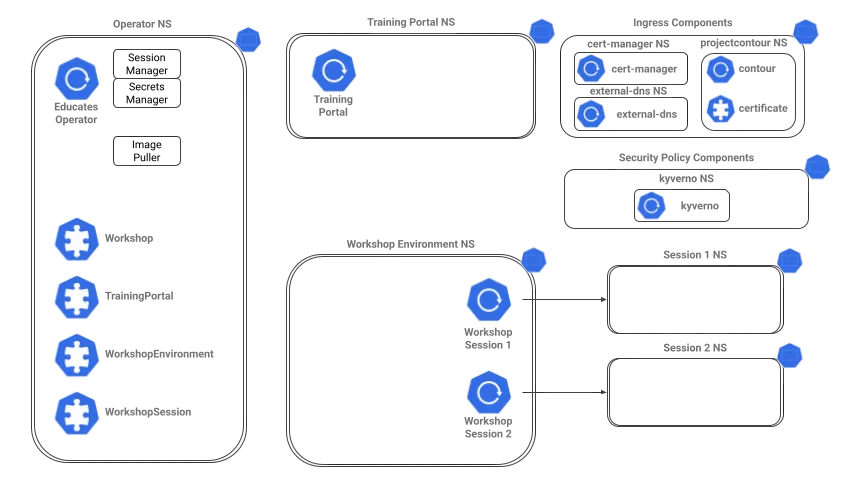
Platform verification
In this section, we will walk through the status of the platform resources.
As a general rule, if you do not see the K8s resources shown running in ready state, the Educates cluster will not service portals and workshops correctly.
Ingress
The following are the steps to verify functioning ingress:
-
Verify the contour deployment:
Terminal window kubectl get deployments -n projectcontour -o wideWe see the following output:
NAME READY UP-TO-DATE AVAILABLE AGE CONTAINERS IMAGES SELECTORcontour 2/2 2 2 1h contour ghcr.io/projectcontour/contour@sha256:ba4fd19911bd603e3857fafdd17bd44c687ea1ab52b12f8ddc7971ba68f9b532 app=contour -
Verify the Contour Envoy deployment:
Terminal window kubectl get daemonsets -n projectcontour -o wideWe see the following output:
NAME DESIRED CURRENT READY UP-TO-DATE AVAILABLE NODE SELECTOR AGE CONTAINERS IMAGES SELECTORenvoy 3 3 3 3 3 <none> 1h shutdown-manager,envoy ghcr.io/projectcontour/contour@sha256:ba4fd19911bd603e3857fafdd17bd44c687ea1ab52b12f8ddc7971ba68f9b532,index.docker.io/envoyproxy/envoy@sha256:2ef22f7a72d3008d68bd4912f52b9a3d466d00db31a567dffa1b103e42eb9198 app=envoy -
Verify the cert-manager deployment:
Terminal window kubectl get deployments -n cert-manager -o wideWe see the following output:
NAME READY UP-TO-DATE AVAILABLE AGE CONTAINERS IMAGES SELECTORcert-manager 1/1 1 1 1h cert-manager-controller quay.io/jetstack/cert-manager-controller@sha256:abe34d3c2a4834258b0365f1cd6ebd2fcf7f133fb9e6c3b9d4fb6cec8975d61a app.kubernetes.io/component=controller,app.kubernetes.io/instance=cert-manager,app.kubernetes.io/name=cert-managercert-manager-cainjector 1/1 1 1 1h cert-manager-cainjector quay.io/jetstack/cert-manager-cainjector@sha256:ecf0a3e7997f17784e061e49e1f53fc299812b329ec768bd601f1c521cea2658 app.kubernetes.io/component=cainjector,app.kubernetes.io/instance=cert-manager,app.kubernetes.io/name=cainjectorcert-manager-webhook 1/1 1 1 1h cert-manager-webhook quay.io/jetstack/cert-manager-webhook@sha256:1c3d73c2fb81e16d059ffee3449d33760144d0e5cf421f4ee08f46e126bea140 app.kubernetes.io/component=webhook,app.kubernetes.io/instance=cert-manager,app.kubernetes.io/name=webhook -
Verify the External DNS deployment:
Terminal window kubectl get deployments -n external-dns -o wideWe see the following output:
NAME READY UP-TO-DATE AVAILABLE AGE CONTAINERS IMAGES SELECTORexternal-dns 1/1 1 1 1h external-dns registry.k8s.io/external-dns/external-dns@sha256:3fcad62c4a9a8a72cb2db5ce7adeb121be66cac5f7f5ddad43684c2b20c72aa5 app=external-dns -
Verify the wildcard certificate:
Terminal window kubectl get certificates.cert-manager.io -n projectcontour --output wideWe see the following output:
NAME READY SECRET ISSUER STATUS AGEeducateswildcard True educateswildcard educateswildcard Certificate is up to date and has not expired 1hNote that the certificate is ready, and its status is up-to-date and not expired.
If the certificate ready state is
False, TLS ingress will break.
Operator workloads
-
Verify the operator deployments:
Terminal window kubectl get deployments -n educates -o wideWe see the following output:
NAME READY UP-TO-DATE AVAILABLE AGE CONTAINERS IMAGES SELECTORsecrets-manager 1/1 1 1 1h operator ghcr.io/educates/educates-secrets-manager@sha256:a21cc5ce05a5e447680efbdf36d9a410eae73d0db48807c075a0a4229c1f8a38 deployment=secrets-managersession-manager 1/1 1 1 1h operator ghcr.io/educates/educates-session-manager@sha256:20ff656e641aa3155a3ff5a02c215964f1d88ca4435f72d029845d0afac90765 deployment=session-manager -
Verify the image pullers:
Terminal window kubectl get daemonsets -n educates -o wideWe see the following output:
NAME DESIRED CURRENT READY UP-TO-DATE AVAILABLE NODE SELECTOR AGE CONTAINERS IMAGES SELECTORimage-puller 3 3 3 3 3 <none> 1h pause ghcr.io/educates/educates-pause-container@sha256:f56481cab3485964d9072eb03011e3a6b145c35b7b92cec9d0439cd459b348eb app=image-puller
Security policy engine
-
Verify kyverno deployments:
Terminal window kubectl get deployments -n kyverno -o wideWe see the following output:
NAME READY UP-TO-DATE AVAILABLE AGE CONTAINERS IMAGES SELECTORkyverno-admission-controller 1/1 1 1 1h kyverno ghcr.io/kyverno/kyverno@sha256:c4f44e3cc9999d75bd54cccf4e2ceacf50c6d3170461109677c7383154d15fdb app.kubernetes.io/component=admission-controller,app.kubernetes.io/instance=kyverno,app.kubernetes.io/part-of=kyvernokyverno-background-controller 1/1 1 1 1h controller ghcr.io/kyverno/background-controller@sha256:46f1f19b7c71b0116eb8f8768bdbeeb2c8762b8831e158ceed1b2b3fc0b0ed34 app.kubernetes.io/component=background-controller,app.kubernetes.io/instance=kyverno,app.kubernetes.io/part-of=kyvernokyverno-cleanup-controller 1/1 1 1 1h controller ghcr.io/kyverno/cleanup-controller@sha256:79f6a4824063c2078921107b322d04847d5fbdcfac8a054fe4a50eeed621445a app.kubernetes.io/component=cleanup-controller,app.kubernetes.io/instance=kyverno,app.kubernetes.io/part-of=kyvernokyverno-reports-controller 1/1 1 1 1h controller ghcr.io/kyverno/reports-controller@sha256:e9cddf1464cbd9625aa02d6ce239b37a18a29a3f9a7c16851c08d68831cde83a app.kubernetes.io/component=reports-controller,app.kubernetes.io/instance=kyverno,app.kubernetes.io/part-of=kyverno
Workshop verification
In this section, we will walk through the verification of a workshop, its portal and associated workshop environment.
As a general rule, if you do not see the K8s resources shown, the Educates cluster likely will not service user workshop sessions.
Deploy workshop and portal
-
Install the sample workshop and portal:
Terminal window educates deploy-workshop -f https://github.com/educates/lab-k8s-fundamentals/releases/latest/download/workshop.yamlWe see the following output:
Loaded workshop "educates-cli--lab-k8s-fundamentals-a817ec1".Creating new training portal "educates-cli".Workshop added to training portal.
Verify workshop and portal deployments
-
We verify the portal and workshop components via the
educatescli:Terminal window educates list-portalseducates list-workshopsWe see the following output:
NAME CAPACITY URLeducates-cli 5 https://educates-cli-ui.gcp.educates.academyNAME ALIAS CAPACITY SOURCEeducates-cli--lab-k8s-fundamentals-a817ec1 5 https://github.com/educates/lab-k8s-fundamentals/releases/latest/download/workshop.yaml -
We also verify the workshops, training portals, and associated workshop environments querying the Educates custom resources:
Terminal window kubectl get trainingportals.training.educates.devkubectl get workshops.training.educates.devkubectl get workshopenvironments.training.educates.devWe see the following output:
NAME URL PORTALPASSWORD ADMINUSERNAME ADMINPASSWORD STATUS MESSAGEeducates-cli https://educates-cli-ui.gcp.educates.academy <redacted> <redacted> <redacted> RunningNAME URLeducates-cli--lab-k8s-fundamentals-a817ec1NAME WORKSHOP URL STATUS MESSAGEeducates-cli-w01 educates-cli--lab-k8s-fundamentals-a817ec1 RunningNote that in both outputs we see the portal url.
The portal resource is an instance of the
TrainingPortalcustom resource type, while the workshop resource is an instance of theWorkshop, and the workshop environment resource is an instance of theWorkshopEnvironment.Keep in mind the name of the workshop environment
educates-cli-w01, we will need that later when verifying workshop session workloads. The workshop session deployments run in a namespace associated with the workshop environment (see the platform architecture diagram above).Notice the difference between the
educatesandkubectloutputs. In the latter we see credentials for the training portal access, where as theeducatesoutput does not show them. -
Get the portal credential from the
educatescli.Terminal window educates view-credentialswill output the
PORTALPASSWORDvalue as we saw in thekubectloutput.Note that the portal password is not normally used in secure-hardened environments.
Browse the portal catalog
Normally a user will access Educates either directly through a training portal website by its url (as previously shown in the portal outputs), or indirectly through a web site that embeds Educates, and launch workshop sessions via API.
The educates CLI does have a short cut that will automatically post the URL in a browser window:
-
Execute the following command:
Terminal window educates browse-workshopsWe see the following output:
Training portal "educates-cli".Checking training portal is ready.Opening training portal https://educates-cli-ui.gcp.educates.academy/workshops/access/?password=<redacted>&redirect_url=%2F. -
We also see a browser window open. If this were the first time deploying this workshop to the cluster, we would be prompted for a password. Use the output of the
educates view-credentialscommand.We then see the portal UI, that shows a single workshop in the portal's workshop catalog:
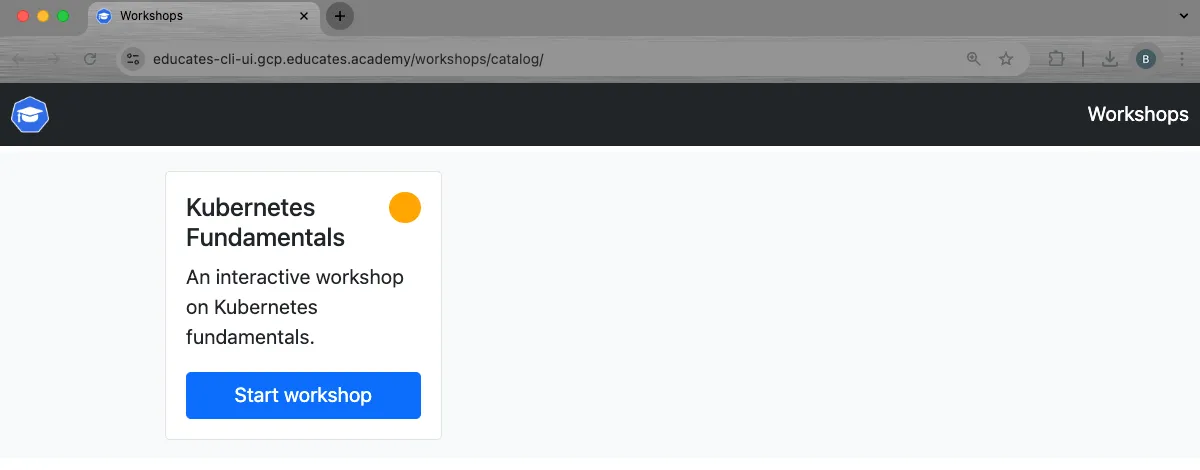
Launch a workshop session
-
Click on the Start workshop button of the only workshop shown. The browser will redirect to the following url:

We can probably reason that the workshop session id
educates-cli-w01-s001. gives some information:-
educates-cli-w01is the associated workshop environment. -
s001is a unique identifier for a particular session associated with the workshop environment.
Remember the session id for later, we will see it can be used to reference K8s resources.
We initially see a progress spinner like this:
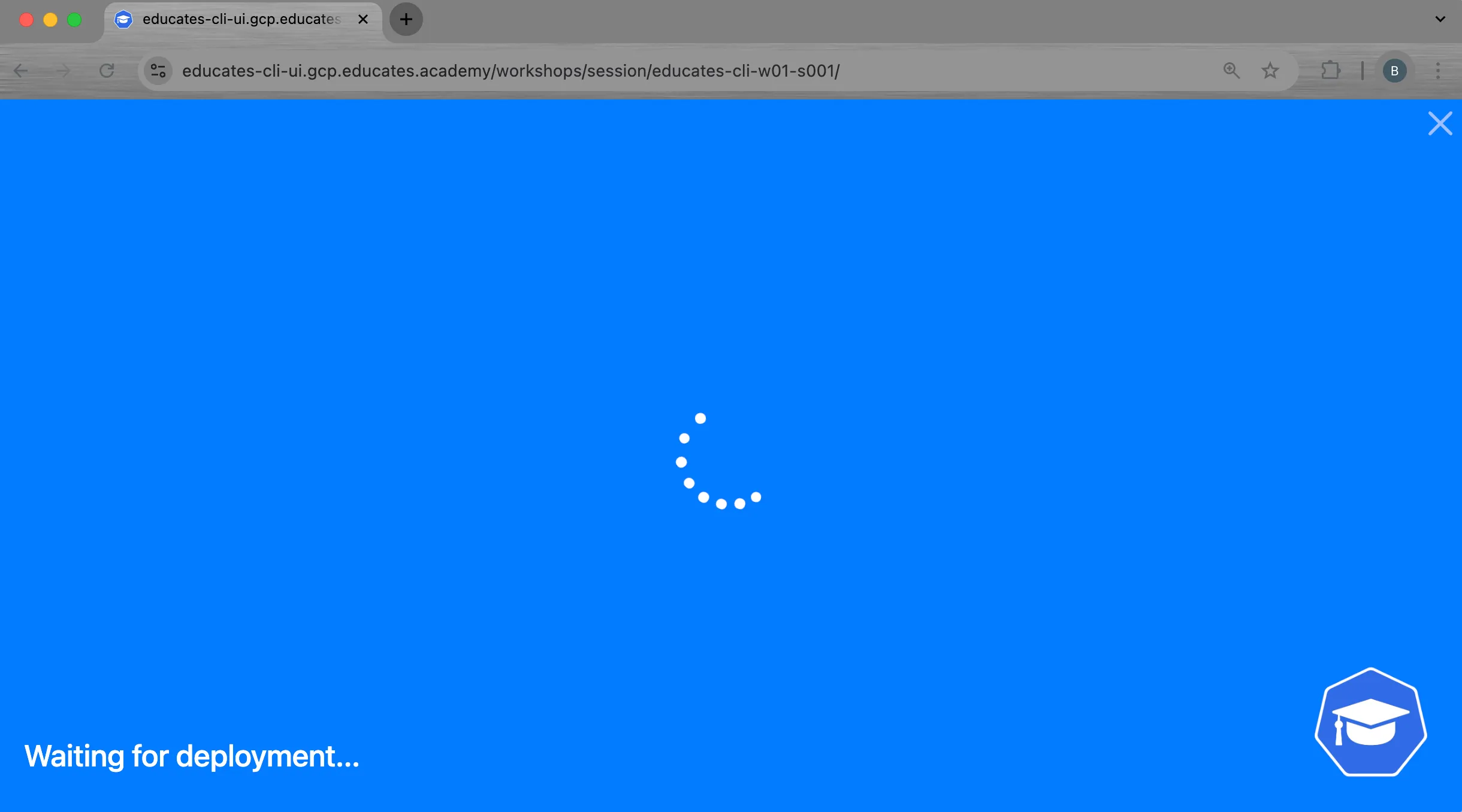
-
-
After 10 seconds or so, We see the workshop overview page:
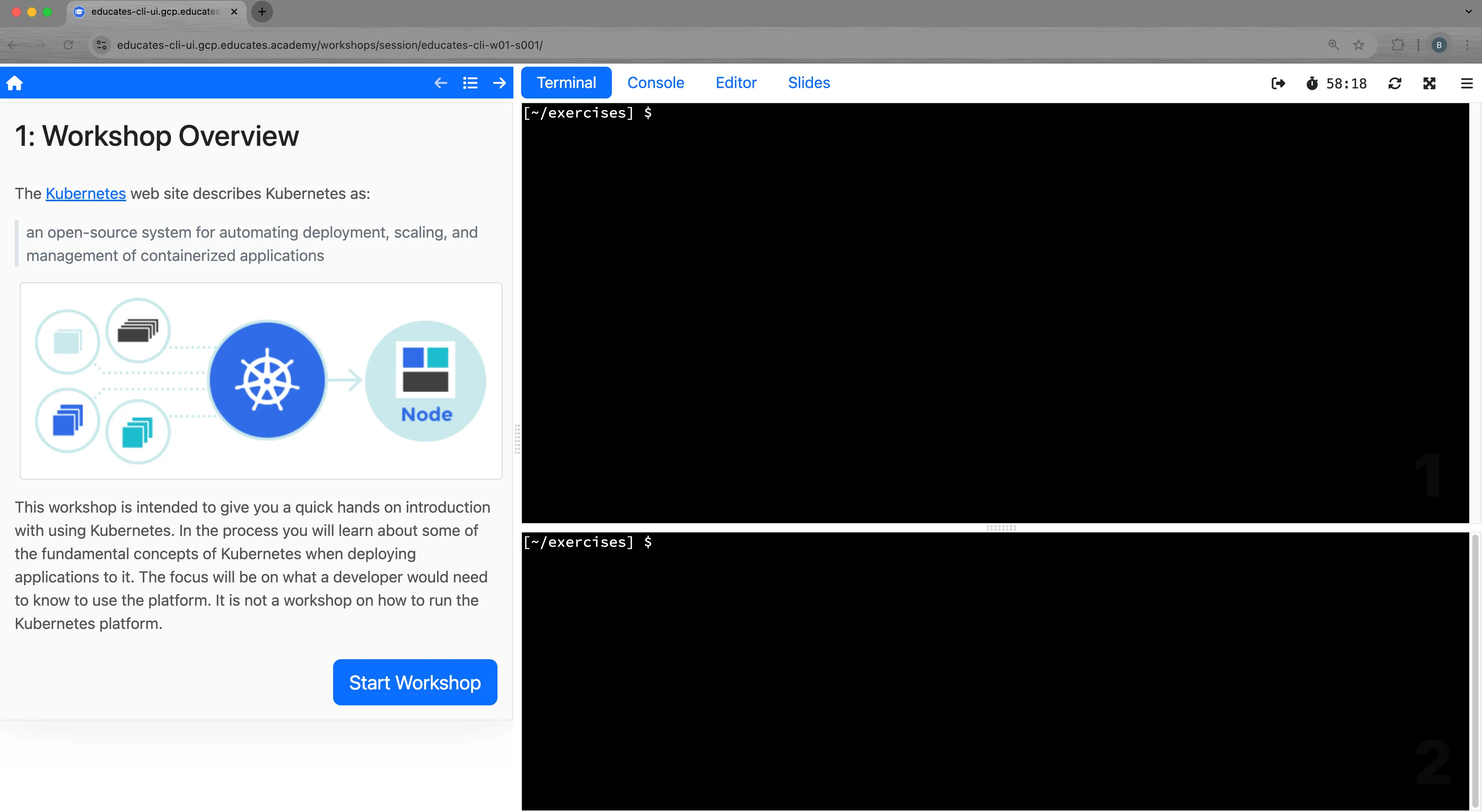
-
In the top terminal window, run the following command:
Terminal window env|grep SESSIONThis will show something like this:
TERMINAL_SESSION_ID=1SESSION_ID=s001SESSION_HOSTNAME=educates-cli-w01-s001.gcp.educates.academySESSION_NAMESPACE=educates-cli-w01-s001SESSION_URL=https://educates-cli-w01-s001.gcp.educates.academySESSION_COOKIE_DOMAIN=SESSION_NAME=educates-cli-w01-s001We see the relationship of the environment variables to the workshop url.
-
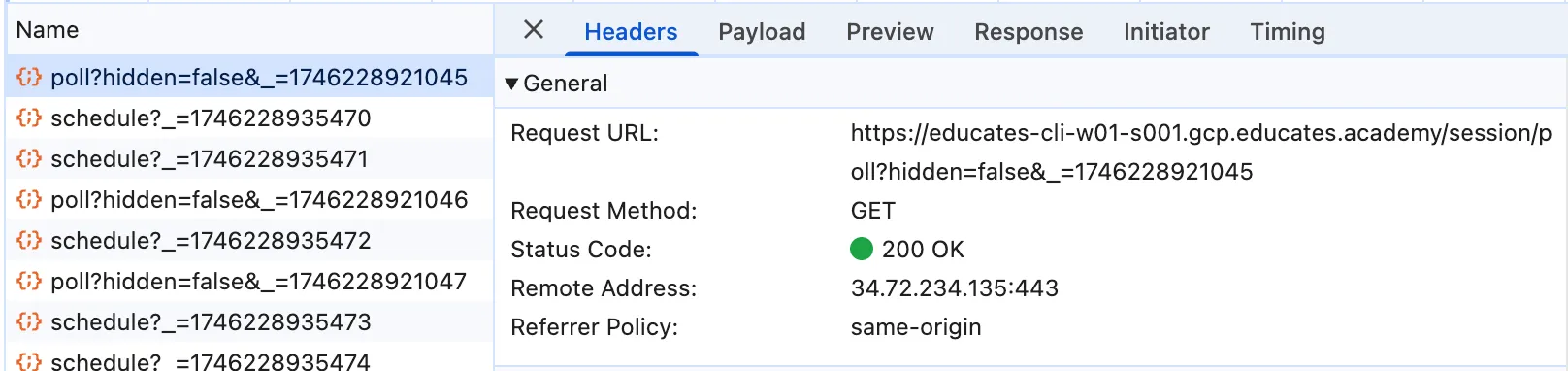
When running the browser developer tools network view, We see the browser interact with the workshop session endpoint:
Verify workshop session
Let us now look at the workshop session in the educates cluster:
-
List workshop sessions via
educatescli:Terminal window educates list-sessionsWe see the following output:
NAME PORTAL ENVIRONMENT STATUSeducates-cli-w01-s001 educates-cli educates-cli-w01 Allocated -
List workshop sessions via
kubectlcli:Terminal window kubectl get workshopsessions.training.educates.devWe see the following output:
NAME URL USERNAME PASSWORD STATUS MESSAGEeducates-cli-w01-s001 https://educates-cli-w01-s001.gcp.educates.academy AllocatedNote the workshop session names match that we see from the workshop URL, and the URLs match between the browser network trace and the backend URL.
Verify workshop session K8s resources
So far we have seen the Educates custom resources. What about how that translates to Kubernetes workloads?
Let us look at that now.
-
Look at the k8s resources in the workshop environment namespace
educates-cli-w01:Terminal window kubectl get deploy,svc,ingress -n educates-cli-w01 -o wideWe the following deployments, services and ingresses:
NAME READY UP-TO-DATE AVAILABLE AGE CONTAINERS IMAGES SELECTORdeployment.apps/educates-cli-w01-s001 1/1 1 1 13m workshop ghcr.io/educates/educates-base-environment@sha256:02aec83f20ff16a3d9d6ca757c7da80769134d3ede431b0a6875c18fefc1f2c2 deployment=educates-cli-w01-s001NAME TYPE CLUSTER-IP EXTERNAL-IP PORT(S) AGE SELECTORservice/educates-cli-w01-s001 ClusterIP 10.2.12.209 <none> 80/TCP 13m deployment=educates-cli-w01-s001NAME CLASS HOSTS ADDRESS PORTS AGEingress.networking.k8s.io/educates-cli-w01-s001 <none> educates-cli-w01-s001.gcp.educates.academy,console-educates-cli-w01-s001.gcp.educates.academy,educates-cli-w01-s001-console.gcp.educates.academy + 2 more... 34.72.234.135 80, 443 13mWe see that the workshop session includes a deployment that provides the development container where the workshop session runs (similar to devcontainers), as well as service and ingress that support integration with the UI.
At this point, we could terminate the workshop session through the UI, or, just wait for it to time out.
That takes us to the end of the Educates cluster verification process.
In future posts we will explore in more depth how the resources work together, architecture, and workshop session lifecycle.
Video
You can also watch the accompanying video for more context:
Conclusion
We verified the platform installation, as well as a minimal acceptance of a sample training portal and workshop deployment.
In the next part of this series, we'll walk through the ingress architecture of a cloud provider installation.